



- Home
- Online casinos
- CoinCasino Mobile App Download
 United States is accepted
English website
18+ | T&C applyPlay Responsibly New casino
- #24.6Winna Casino4.6
 Instant rakeback every 7 minutes + level-up spins$10K Daily and $50K Weekly RacesUnited States is accepted18+ | T&C applyPlay ResponsiblyNew casino
 - United States is accepted18+ | T&C applyPlay ResponsiblyNew casino


CoinCasino Mobile App Download
We will save you time: CoinCasino does not currently offer a separate Android APK or a standalone iOS app in the Apple App Store. Instead, the casino runs directly through coincasino.com, and the mobile version works just as well on a phone as it does on a laptop.
You can open CoinCasino in Chrome on Android, Safari on iPhone, or any other modern mobile browser. The site automatically adjusts to your screen size, giving you access to the full casino without having to download or install anything.
For quicker access, you can add CoinCasino to your home screen on Android or iPhone. This creates an app-like shortcut, so you can open the casino with one tap. This guide explains how to do what.
Does CoinCasino have a mobile app?
| Question | Answer |
|---|---|
| Native Android app? | ❌ No |
| APK available? | No — CoinCasino does not host one |
| Google Play listing? | ❌ No |
| Native iOS app? | ❌ No |
| App Store listing? | ❌ No |
| Mobile browser version? | ✅ Yes — full feature parity with desktop |
| Home-screen shortcut (PWA-style)? | ✅ Yes — Android and iOS both supported |
| Account required before setup? | ❌ No |
| Full game catalogue on mobile? | ✅ Yes — 4,000+ titles |
| Promotions on mobile? | ✅ Yes — identical to desktop offers |
Since CoinCasino does not provide official installation files, players should avoid third-party APKs or unofficial app download pages. The safest way to access CoinCasino on mobile is through the official website: coincasino.com.
How to access CoinCasino on Android
You can use CoinCasino on any modern Android device without downloading an APK. Simply open Chrome (or any other browser), go to coincasino.com, and sign in or create your account straight from the mobile browser.
To get to CoinCasino, add the app to your Android home screen:
- Visit coincasino.com.
- Tap the three-dot menu in the upper-right corner.
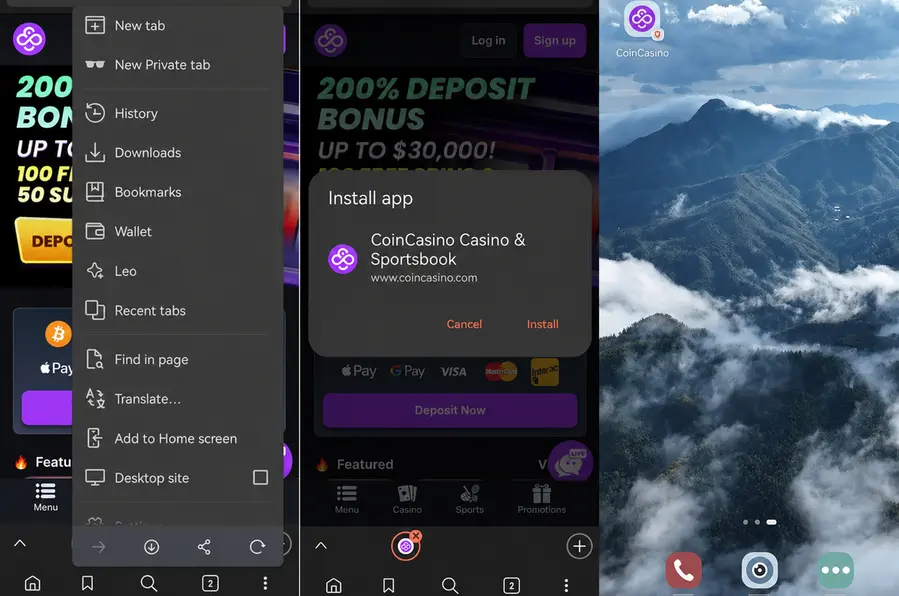
- Select “Add to Home screen.”
- Choose a name for the shortcut.
- Confirm, and the CoinCasino icon will appear on your home screen.
Once added, you can open CoinCasino with one tap. The shortcut opens the official mobile website, so any updates to CoinCasino appear automatically through the browser.
How to access CoinCasino on iPhone and iPad
You don't need to download an app from the App Store. Just open Safari, go to coincasino.com, and sign in or create your account using the mobile browser.
To add CoinCasino to your iPhone or iPad home screen, just follow these simple steps:
- Open coincasino.com in Safari.
- Tap the Share icon at the bottom of the screen.
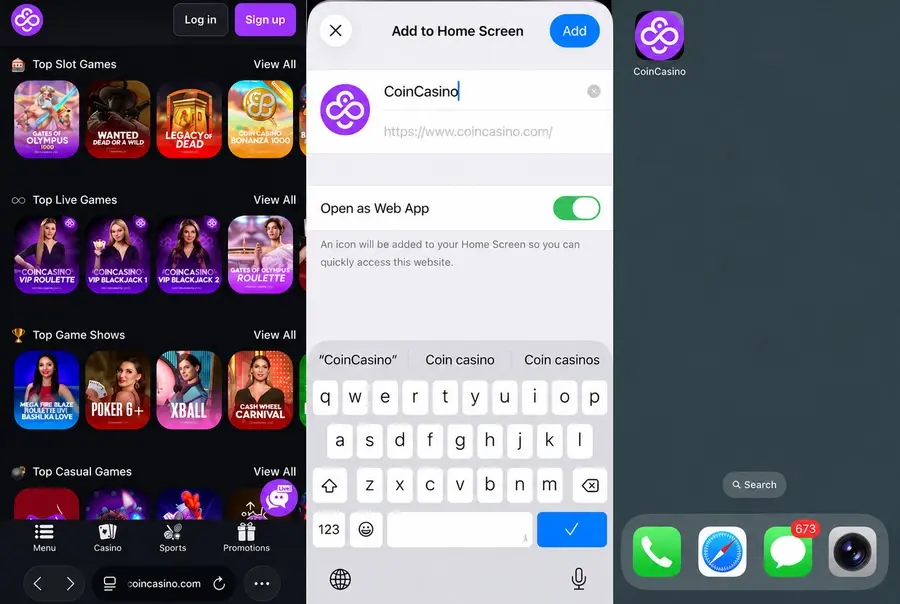
- Scroll through the menu and select “Add to Home Screen.”
- Rename the shortcut if needed.
- Tap “Add” in the top-right corner.
The CoinCasino mobile site automatically adjusts to iOS screens, giving you access to the casino lobby, games, account menu, cashier, and promotions without any extra setup.
One practical note: if a CoinCasino listing does appear in the App Store at some future date, check the developer name against the official brand before installing. Any third-party site currently claiming to offer an iOS app for CoinCasino is not legitimate.
Shortcut vs browser: what actually differs?
In short, both routes arrive at the same destination. The shortcut holds no exclusive content — no games that the browser withholds, no promotions tied to the icon, no performance edge. What it removes is one step: instead of opening Chrome or Safari, typing an address, and waiting for the page, the player taps one icon and lands directly in the casino. That is the full extent of the difference. Neither method delivers push notifications.
CoinCasino mobile web app overview
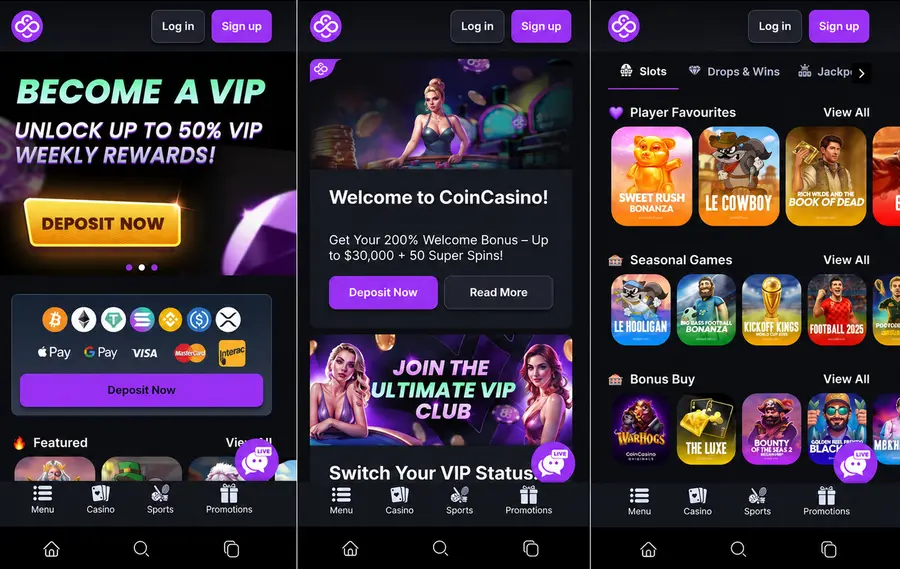
The CoinCasino mobile interface is designed for smaller screens and has the same main sections as the desktop version. The site adjusts automatically for vertical scrolling and touch controls, so you can move between Casino, Slots, Live Casino, Game Shows, Casual Games, Sports, and Promotions from the mobile menu.
The mobile casino includes:
- Slots with 4,000+ titles from more than 70 providers, including Pragmatic Play, Evolution, Play’n GO, Hacksaw Gaming, and NetEnt.
- Live Casino games such as Blackjack, Roulette, Baccarat, and Craps from providers including Evolution, Pragmatic Play Live, Live88, and ICONIC21.
- Game Shows such as Wheel of Fortune, Cash Wheel Carnival, and Stairpong.
- Casual Games including Crash, Plinko, Aviator, Spaceman, Crash X, and Turbo Mines.
- Sports betting across 30+ sports, including football, cricket, basketball, tennis, MMA, and eSports.
- Demo mode on supported slots through the “Play For Fun” button.
The cashier works directly from the mobile interface and supports both crypto and fiat payments. CoinCasino accepts more than 21 cryptocurrencies, including BTC, ETH, SOL, USDT, USDC, and DOGE, along with fiat options such as Visa, Mastercard, Apple Pay, and Google Pay.
Customer support is also available on mobile. You can open live chat inside the mobile interface or contact the team by email at [email protected].
FAQ
- United States is accepted18+ | T&C applyPlay ResponsiblyNew casino
- #24.6Winna Casino4.6Instant rakeback every 7 minutes + level-up spins$10K Daily and $50K Weekly RacesUnited States is accepted18+ | T&C applyPlay ResponsiblyNew casino
- United States is accepted18+ | T&C applyPlay ResponsiblyNew casino