



- Home
- Online casinos
- Vavada Mobile App Download
 United States is accepted
English website
18+ | T&C applyPlay Responsibly New casino
- United States is accepted18+ | T&C applyPlay ResponsiblyNew casino
- United States is accepted18+ | T&C applyPlay Responsibly


Vavada Mobile App Download
Vavada Casino offers a dedicated mobile app for both Android and iOS. Android users download the APK directly from vavada.com — it is not on Google Play. iPhone and iPad users are directed from the site footer to the App Store.
You can also play directly from a mobile browser without installing anything.
This guide covers where to find the APK, how the iOS installation works, and how the app compares to playing in a browser — including the two features only the app provides.
Does Vavada Casino have a mobile app?
| Question | Answer |
|---|---|
| Native Android app? | ✅ Yes — APK |
| APK available? | ✅ Yes — from the footer of vavada.com |
| Google Play app? | ❌ No |
| Native iOS app? | ✅ Yes — App Store (link in site footer) |
| App Store listing? | ✅ Yes — via "Application for iOS" in footer |
| Mobile browser version? | ✅ Yes — fully optimised HTML5 |
| PWA / home-screen shortcut? | ✅ Yes — Safari shortcut available as alternative |
| Registration required before install? | ❌ No — install first, register later |
| Same games as desktop (4,500+)? | ✅ Yes |
| Demo mode on mobile? | ✅ Yes — slots only; not available for live casino |
| Mobile bonuses available? | ✅ Yes — same as desktop |
How to download and install Vavada on Android
The Vavada Android app is not available on Google Play. To install it, Android users need to download the APK file directly from the official Vavada website.
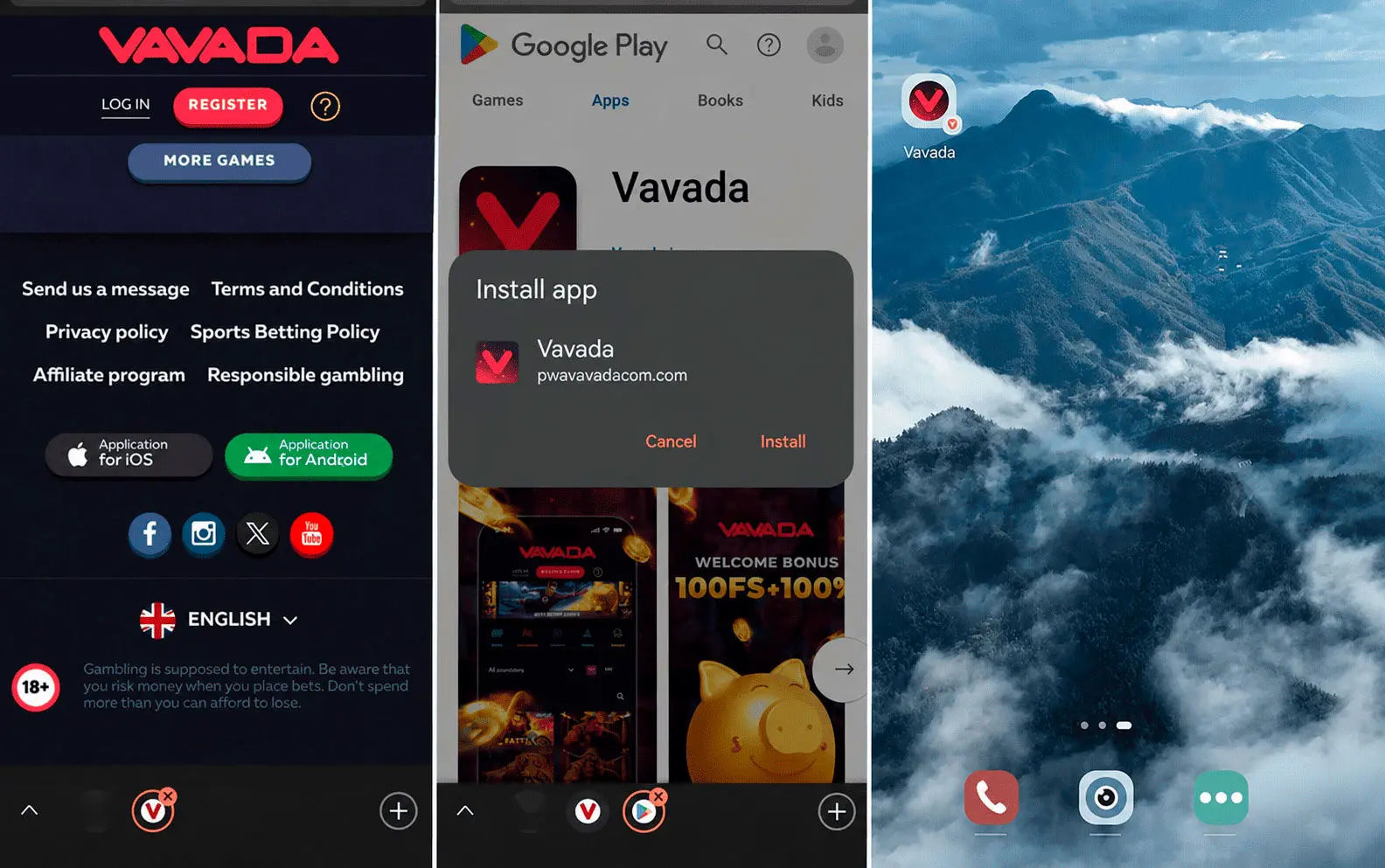
You can usually find the Android app link in the footer of vavada.com. On some Android devices, a download banner may also appear automatically when you open the site in Chrome or another mobile browser.
Installation steps:
- Follow the link in Chrome or your default Android browser.
- Scroll to the bottom of any page and tap "Application for Android"
- You will be redirected to the APK download page — tap the download button and confirm.
- Go to Settings → Security → Install unknown apps (or "Unknown sources" on older Android versions) and enable installation for your browser
- Open the downloaded APK file from your Downloads folder or the notification bar and tap Install
- Once installed, the Vavada icon appears on your home screen — open the app and log in or register
Safety note: do not download the Vavada APK from third-party mirror sites, APK hosting platforms, or unofficial links. Files from unofficial sources may be modified, outdated, or unsafe.
Technical note: The "unknown sources" warning is a standard Android security message for any app installed outside Google Play. It does not indicate the file is unsafe when downloaded from the official site. For extra security, you can turn off the “Install unknown apps” permission for your browser after the installation is complete.
Update note: The Vavada APK does not update automatically — there is no Google Play mechanism to handle this. When a new version is released, download the updated file and reinstall again.
How to play Vavada Casino on iPhone and iPad
The Vavada iOS app is available through the App Store where supported. You can find the download link in the footer of vavada.com under “Application for iOS.” If you tap this link, you will be taken to the official App Store listing.
To install:
- Follow the link in Safari or Chrome on your iPhone or iPad
- Scroll to the bottom of any page and tap "Application for iOS"
- You will be redirected to the App Store.
- Tap "Get" to download the app.
- Wait for the installation to complete.
- Open the app and log in with your existing account, or register directly within the app
The App Store version updates automatically, unlike the Android APK. No permission changes are required — the installation follows the standard iOS process.
If the Vavada app is not available in your region, you can still access the mobile version through Safari. Open vavada.com, tap the Share button, and select “Add to Home Screen.” This creates a shortcut to the Vavada mobile site on your iPhone or iPad.
Vavada Casino app vs mobile website
| Feature | Mobile app (APK / App Store) | Mobile website (browser) |
|---|---|---|
| Installation required | ✅ Yes | ❌ No |
| Works on Android | ✅ Yes — APK | ✅ Yes |
| Works on iOS | ✅ Yes — App Store | ✅ Yes |
| Bypasses regional blocks | ✅ Yes (Android APK) | ❌ No |
| Access to 4,500+ slots | ✅ Yes | ✅ Yes |
| Live casino (Evolution Gaming and others) | ✅ Yes | ✅ Yes |
| Demo mode (slots only) | ✅ Yes | ✅ Yes |
| Slot tournaments | ✅ Yes | ✅ Yes |
| Deposits and withdrawals | ✅ Yes | ✅ Yes |
| All bonuses | ✅ Yes | ✅ Yes |
| Push notifications | ✅ Yes | ❌ No |
| Auto-updates | iOS: Yes / Android: No — manual | N/A |
| Best for | Regular players; regions with access restrictions | Occasional play; no installation needed |
Both options reach the same game library, the same cashier, and the same promotions. The mobile website is sufficient for most players. The app adds two practical advantages:
- Push notifications for new bonuses and tournaments.
- More stable access in some regions where browser access to vavada.com may be limited.
The second point mainly applies to the Android APK version.
Important: don't use the app to ignore local or regional rules or restrictions. If Vavada is not available in your country, just because you have the app doesn't mean you can play with real money.
Mobile experience and performance
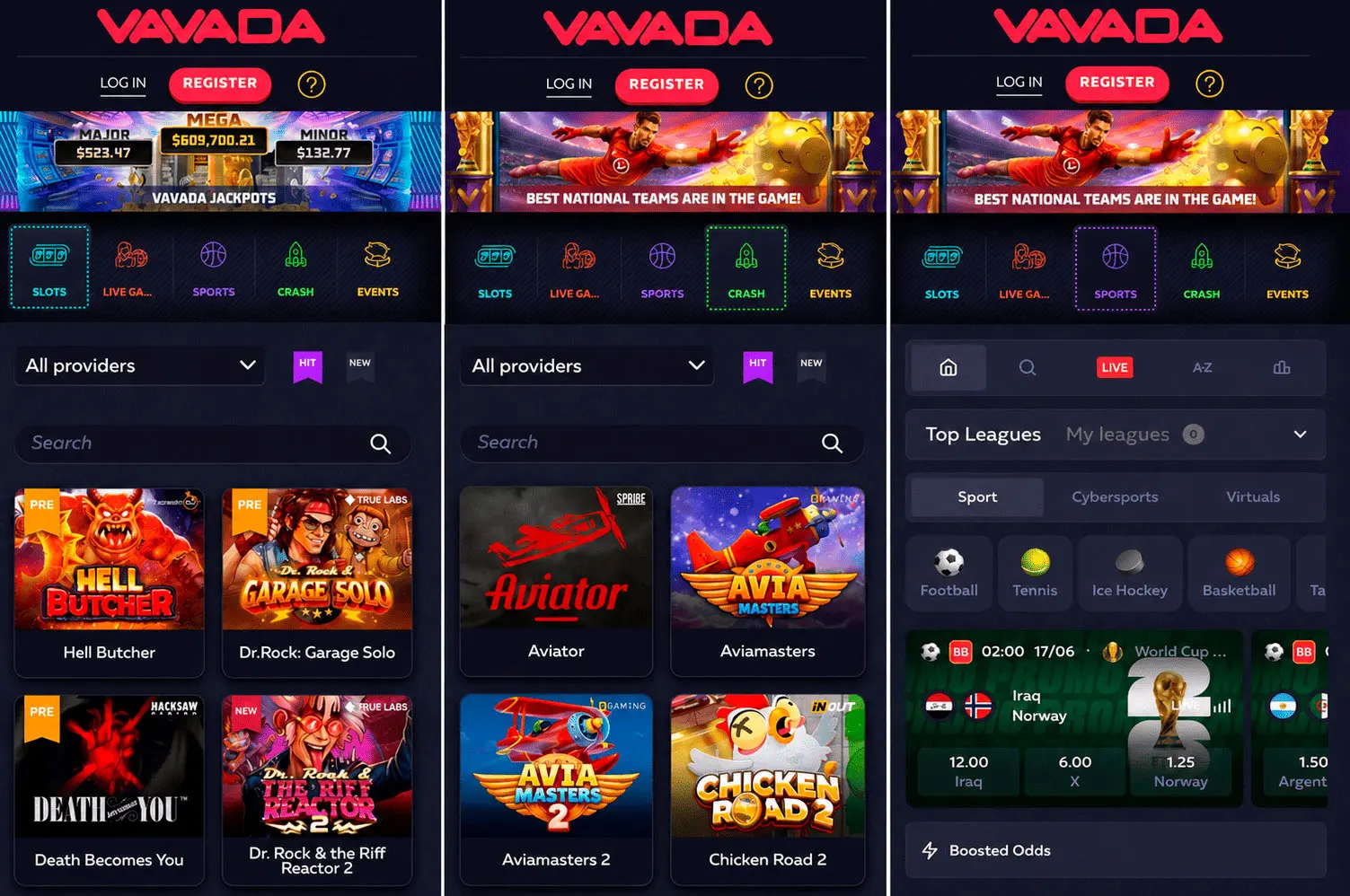
The Vavada mobile site is built on HTML5 and adapts well to different screen sizes. The interface is designed for vertical scrolling and touch controls, so you can browse the casino comfortably from both Android and iOS devices.
The main menu gives quick access to Slots, Live Casino, Tournaments, Bonuses, and VIP. You do not need to return to the homepage to switch between sections. The dark design, high-contrast game tiles, and clear category labels make the mobile layout easy to read and navigate.
In the slots section, game tiles display NEW and HOT markers, helping you spot recent releases and popular titles quickly. You can also use provider filters to narrow the catalogue by studio, which is useful because Vavada features games from 50+ providers. The search bar works across the full casino library and helps you find specific titles faster.
Demo mode is available on supported slots and can be launched directly from the game tile. This allows players to test a slot before playing for real money. Live casino games are not available in demo mode and require a logged-in account with a funded balance.
The Cashier is also available from the mobile menu. Crypto and card deposit options appear in the same section, so you do not need to switch to desktop to manage payments. Crypto withdrawals are usually faster, while card and e-wallet withdrawals depend on the payment provider’s processing times.
Live casino tables from Evolution Gaming and other studios load directly in the mobile browser or app. On some games, the table may switch to landscape mode automatically. Rotating the device is usually enough to continue playing without changing any settings.
FAQ
- United States is accepted18+ | T&C applyPlay ResponsiblyNew casino
- United States is accepted18+ | T&C applyPlay ResponsiblyNew casino
- United States is accepted18+ | T&C applyPlay Responsibly