



- Home
- Online casinos
- Stake Casino App Download
 United States is accepted
English website
18+ | T&C applyPlay Responsibly New casino
- #24.6Winna Casino4.6
 Instant rakeback every 7 minutes + level-up spins$10K Daily and $50K Weekly RacesUnited States is accepted18+ | T&C applyPlay ResponsiblyNew casino
 - United States is accepted18+ | T&C applyPlay ResponsiblyNew casino


Stake Casino App Download
Getting Stake onto your phone takes under a minute regardless of which device you're holding. Neither Android nor iPhone users have a native app from Stake — there is no Play Store listing and no App Store app. Instead, the PWA setup through Chrome (Android) or Safari (iOS) gets the job done in four taps with no APK required.
And for anyone on either platform who prefers zero installation, the full Stake runs in a mobile browser without any setup at all. This guide covers both paths: what each one involves, how to set it up, and what the mobile experience actually delivers once you're in.
Does Stake Casino have a mobile app?
| Question | Answer |
|---|---|
| Native iOS app (App Store)? | ❌ No |
| Native Android app (Google Play)? | ❌ No |
| Official APK from Stake? | ❌ No — any APK found online is unofficial |
| PWA / home-screen shortcut (Android)? | ✅ Yes — via Chrome |
| PWA / home-screen shortcut (iOS)? | ✅ Yes — via Safari |
| Mobile browser version? | ✅ Yes — fully functional on all devices |
| Registration required before playing? | ✅ Yes — free, via email or social login |
| Same games as desktop? | ✅ Yes — full feature parity |
| Mobile bonuses available? | ✅ Yes — identical to desktop |
Warning: there is no official Stake APK
Before getting into setup, one thing needs to be stated clearly.
Stake.com does not distribute an APK file. Any file labeled "Stake APK" or "Stake Android app" found on third-party websites, APK mirror repositories, or file-sharing platforms is not produced or endorsed by Stake. As visible in search results, sites like apkpure.net and unofficial domains actively distribute files under the Stake name — none of these are legitimate.
Installing unofficial APKs carries real risks: malware, phishing pages designed to resemble the actual platform, and credential theft. The only safe ways to access Stake Casino on Android are through the official website at stake.com in your mobile browser, or the PWA shortcut installed from there.
Option 1: iOS PWA (iPhone and iPad)
Stake Casino does not have a native app in the Apple App Store. iPhone and iPad users access the full platform through Safari, with a home screen shortcut as the closest equivalent to an installed app icon.
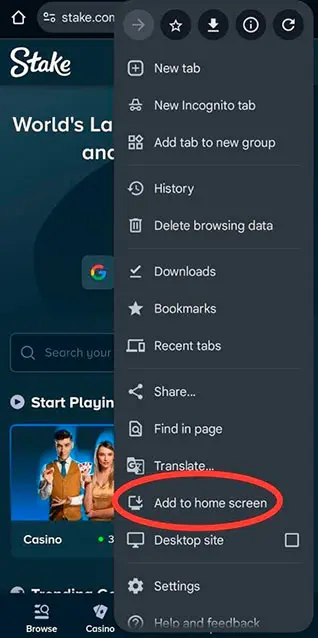
How to set up:
- Open Safari on your iPhone or iPad and go to stake.com
- Tap the Share icon at the bottom of the screen (the square with an upward arrow)
- Select "Add to Home Screen" from the share sheet
- Tap Add to confirm
The Stake icon will appear on your home screen. Tapping it opens the full platform in full-screen Safari — casino, sportsbook, Stake Originals, cashier, and account management — without the browser address bar visible.
This is not a native iOS app. It is a PWA shortcut that loads the full Stake mobile site. The platform updates automatically server-side, so there is no manual update step and no App Store cycle involved.
Option 2: Android PWA (home-screen shortcut)
Stake does not have an official Google Play listing. The platform instead uses PWA technology, which lets the Stake website behave like a native app once added to the home screen through Chrome.
What PWA actually means for you: it is not a regular browser bookmark. Once installed, it launches with its own icon, opens without the browser address bar visible, stays current automatically without manual updates, and takes up no meaningful device storage. Stake's own blog describes it as an app that "behaves just like a regular app" once on your home screen.
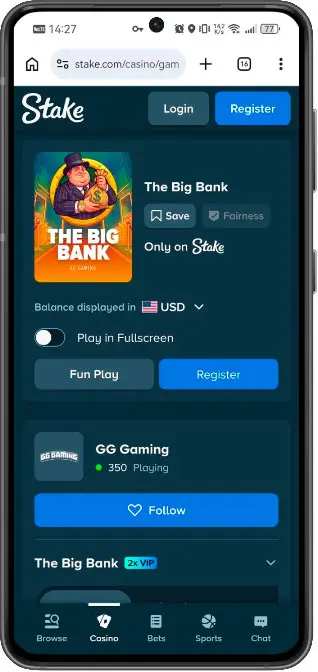
Installation steps:
- Open Chrome on your Android device and go to stake.com
- Tap the three-dot menu (⋮) in the top-right corner
- Select "Install app" or "Add to Home Screen"
- Confirm when prompted
- The Stake icon appears on your home screen — tap it to launch
No APK download. No "allow installation from unknown sources" toggle. No storage space consumed beyond the browser cache. The PWA opens the complete Stake interface: casino lobby, sportsbook, Originals, cashier, and account — all from the home screen icon.
Option 3: mobile browser (no installation needed)
If you prefer not to install anything, opening stake.com in a mobile browser gives access to the online casino without any setup. This works on both Android and iOS, in Chrome, Safari, or any modern browser.
The mobile site detects the device automatically and renders the touch-optimised layout. Registration, login, deposits, withdrawals, and all games are accessible without a dedicated app or shortcut. For casual players, or anyone trying Stake for the first time, this is the lowest-friction starting point.
Comparing your options
| Feature | PWA shortcut | Mobile browser |
|---|---|---|
| Works on iOS | ✅ Yes (Safari) | ✅ Yes |
| Works on Android | ✅ Yes (Chrome) | ✅ Yes |
| Installation required | Add to home screen | ❌ No |
| Home screen icon | ✅ Yes | ❌ No |
| Browser UI hidden | ✅ Yes | ❌ No |
| Automatic updates | ✅ Yes — server-side | N/A |
| Casino — full game library | ✅ Yes | ✅ Yes |
| Stake Originals (Crash, Dice, Keno, Plinko) | ✅ Yes | ✅ Yes |
| Sportsbook | ✅ Yes | ✅ Yes |
| Live betting | ✅ Yes | ✅ Yes |
| Live streaming | ✅ Yes | ✅ Yes |
| Cash Out | ✅ Yes | ✅ Yes |
| All promotions | ✅ Yes | ✅ Yes |
| Crypto wallet (BTC, ETH, USDT, SOL, and more) | ✅ Yes | ✅ Yes |
| Fiat currencies (INR, BRL, TRY, and others) | ✅ Yes | ✅ Yes |
After testing both options side by side, we found that the practical difference comes down to convenience of launch. The PWA shortcut gives a dedicated home screen icon and hides the browser address bar — the closest thing to an installed app on either platform. The browser version requires no setup and works immediately. The game library, cashier, and promotions are identical across both.
What can you do on Stake Casino mobile?
As part of our mobile review, we checked both access methods and found that the Stake mobile interface provides access to every core function of the platform regardless of how it is opened. Navigation is built around a fixed bottom bar — Casino, Poker, Sports, Chat — that remains visible while scrolling, making one-handed use practical on any screen size.
From mobile, players have full access to:
- Account creation and login — register via email or through social accounts (Google, Facebook, Kick); the complete registration flow runs within the mobile interface
- Casino — the full game library, including slots from providers like Pragmatic Play, NetEnt, and Microgaming; the lobby shows live player counts per title in real time
- Stake Originals — Crash, Dice, Keno, Plinko, and other exclusive in-house titles sit under their own dedicated section and open within the mobile session without redirect
- Sportsbook — football, tennis, basketball, CS2, Dota 2, baseball, volleyball, table tennis, and more; in-play markets update continuously
- Live betting — in-play wagers with real-time odds
- Live streaming — sports streams available directly in the mobile interface for supported events
- Cash Out — available on single bets and parlays from mobile
- Crypto cashier — deposits and withdrawals in BTC, ETH, USDT, EOS, DOGE, LTC, SOL, TRX, and other supported assets; instant swaps between cryptocurrencies available within the wallet
- Fiat payments — Canadian dollars, Turkish lira, Vietnamese dong, Indian rupees, Nigerian naira, and other local currencies supported depending on region
- Crypto vault — secure storage for assets within the Stake wallet, accessible on mobile
- VIP Club — progress tracking and rewards claimable without switching to desktop
- 24/7 live chat — opens within the mobile interface, no redirect to an external page
- Responsible gambling tools — self-exclusion, deposit limits, and session controls under account settings.
Mobile experience and performance
During our mobile review, we found that Stake's mobile site uses a dark theme throughout — dark backgrounds with blue and white accents — which keeps the interface readable across different screen sizes and lighting conditions.
We also observed that the fixed bottom navigation eliminates the need to scroll back to the top between sections. Game search and provider filtering are accessible from the casino lobby. Live dealer tables open inline within the mobile session. Some provider titles default to landscape orientation — this is a provider-level setting, not a Stake limitation.
In our comparison, the PWA shortcut supported push notifications on both Android and iOS, keeping players updated on bet results, promotions, and account activity. The mobile browser version does not deliver push notifications.
Two limitations apply regardless of access method: live sports streaming requires a stable connection, with video quality adjusting automatically to network conditions, and some regional payment methods may vary by location.
FAQ
- United States is accepted18+ | T&C applyPlay ResponsiblyNew casino
- #24.6Winna Casino4.6Instant rakeback every 7 minutes + level-up spins$10K Daily and $50K Weekly RacesUnited States is accepted18+ | T&C applyPlay ResponsiblyNew casino
- United States is accepted18+ | T&C applyPlay ResponsiblyNew casino