



- Home
- Casino Articles
- How to Deposit and Withdraw at BC Game Casino (2026 Guide)
How to Deposit and Withdraw at BC Game Casino (2026 Guide)
BC.Game is a major crypto casino offering instant deposits, a broad blockchain network support, and the option to purchase cryptocurrency directly on the website. The platform operates exclusively with digital assets, meaning all deposits and withdrawals are processed through on-chain transactions. An internal exchange also allows players to quickly convert one coin into another without cashing out. Check out this guide, as we’ll break down which cryptocurrencies BC Game Casino supports, how deposits and withdrawals are handled, which networks are available, and what should be kept in mind when making your first transaction




BC Game deposit and withdrawal methods
BCGame Casino supports over 120 crypto coins for deposits and cashouts. The most popular cryptocurrencies and networks are listed below.
| Cryptocurrency | Deposit | Withdrawal | Withdrawal time |
|---|---|---|---|
| USDT | ✅ | ✅ | 1–5 minutes |
| ETH | ✅ | ✅ | ~10 seconds – 5 minutes |
| BTC | ✅ | ✅ | 10–60 minutes |
| USDC | ✅ | ✅ | Few minutes |
| TRX | ✅ | ✅ | 1–3 minutes |
| BNB | ✅ | ✅ | Few seconds – Few minutes |
| LTC | ✅ | ✅ | 5–10 minutes |
| XRP | ✅ | ✅ | 3–5 seconds |
| DOGE | ✅ | ✅ | 1–2 minutes |
| SOL | ✅ | ✅ | Under 1 second |
| POL | ✅ | ✅ | Seconds – minutes |
| BCH | ✅ | ✅ | 1–1.5 hours |
| DAI | ✅ | ✅ | Few minutes |
| TON | ✅ | ✅ | Seconds – minutes |
| DASH | ✅ | ✅ | Tens of minutes – about 1 hour |
The full list of supported coins is displayed in the “Deposit” section and may vary depending on the user's country of registration.
How to deposit BC.Game: step by step
BC Game accounts are funded through the platform’s built-in crypto wallet. After choosing a coin, the system displays the deposit address and available networks, and any transfer from an external wallet is automatically credited to the game balance once confirmed on the blockchain.
How to deposit:
- Open the “Deposit” menu.
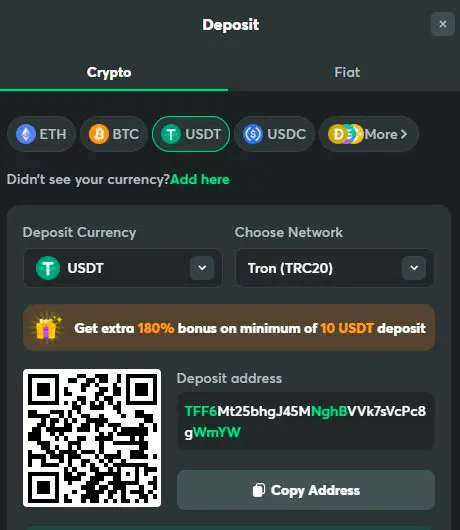
- Select a cryptocurrency.
- Specify the network if one is available (TRC20, ERC20, BEP20, Solana, Base, Polygon etc.).
- Copy the address or use the QR code.
- Send the transfer from your wallet or cryptocurrency exchange.
- Wait for the network confirmations — typically a few seconds to a few minutes.
BC.Game Casino allows you to deposit without email verification or completing your profile — your deposit address becomes available immediately after registration.
Step-by-step guide to making a withdrawal from BC Game
Please note! BC.Game processes withdrawals in the same cryptocurrencies used for deposits, and since all payouts are sent via on-chain transactions, it’s essential to select the correct network and ensure your wallet supports it. Withdrawals are handled through the same internal wallet: choose the asset, enter the external wallet address, and confirm the transaction; requests are processed automatically, with final timing determined by the selected network and its current load.
- Open the “Withdrawal” menu in BC Game account.
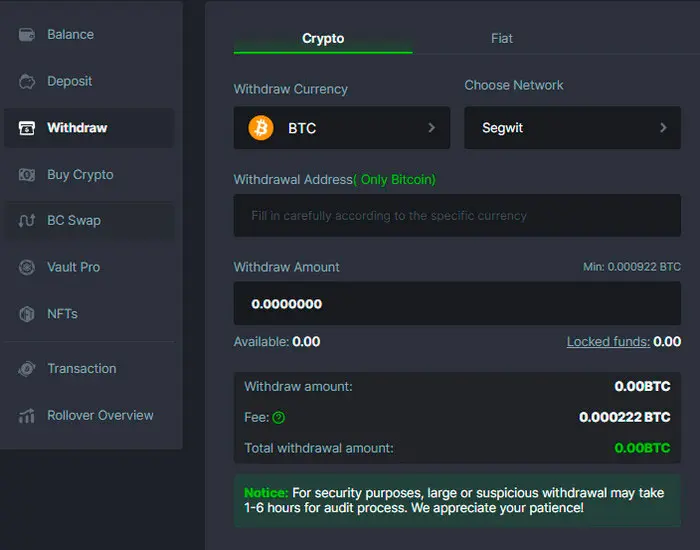
- Select a cryptocurrency from the list.
- Specify the network (if the coin supports multiple options).
- Enter the amount and your wallet address.
- Check the details and confirm your request.
- Wait for network confirmations — the speed depends on the blockchain load.
Popular coins are available for withdrawal, including BTC, ETH, USDT, USDC, BNB, TRX, LTC, XRP and SOL, along with an extended selection of altcoins and stablecoins. For tokens that exist on multiple blockchains, the system provides the option to choose the network—for example, USDT can be withdrawn via TRC20, ERC20, BEP20, Solana, Base, Polygon POS or AVAX C-Chain, depending on the supported options. The full list of available coins and networks is displayed in the “Withdrawal” menu.
The complete list of coins and networks is shown in the “Withdrawal” menu and may vary by region.
BC.Game withdrawal policy
BC.Game handles withdrawals according to the rules outlined in its official terms of use. Players may only withdraw funds that are not linked to active bonuses and have been fully wagered in line with the required turnover.
- Withdrawals are only available for unused and cleared funds; the minimum withdrawal amount is 10 EUR (or equivalent).
- The deposit must be wagered at least once (1x) before a withdrawal can be approved– AML requirement.
- BC Game Casino may require KYC: photo ID, proof of address, selfie, or additional verification.
- By default, withdrawals are sent to the same payment method used for the deposit; alternative methods require additional verification.
- If the account is unavailable, blocked, or closed, withdrawal requests are processed through customer support.
- If your balance exceeds the sum of all deposits by more than 10 times, a monthly withdrawal limit of €5,000 applies; in all other cases, the limit is €10,000.
- The casino does not guarantee successful withdrawals or refunds if the limited use policy is violated.
What can cause a withdrawal failure
In certain situations, a request may be declined or require additional review. Below are the most common reasons why the withdrawal might be delayed.
- Incomplete or partially completed KYC verification.
- Attempt to withdraw bonus funds before the wagering requirements are fulfilled.
- Failure to comply with the minimum or maximum limits for the selected cryptocurrency.
- A withdrawal request is made to a payment method different from the one used for the deposit (if applicable).
- Network errors or blockchain delays during transaction processing.
- Incorrectly specified crypto wallet address.
- Additional verification for large withdrawals or suspicious activity.
Usually, you can fix the issue yourself by checking your info, completing KYC, or finalizing all wagering requirements. If the withdrawal fails after a second attempt, please contact customer support.
Limits, fees, and processing time
Limits and fees on BC.Game vary depending on the chosen cryptocurrency and network, while processing times depend on the current blockchain load. The casino does not add internal transaction fees, but a standard network fee is applied to every withdrawal.
Minimum amounts, limits, and estimated processing times are displayed directly in the deposit and withdrawal window.
| Cryptocurrency | Network | Min Deposit | Min Withdrawal | Withdrawal time |
|---|---|---|---|---|
| USDT | TRC20, ERC20 | $1 | TRC20 ($23), ERC20 ($21) | 1–5 minutes |
| ETH | ERC20 | 3 | 205 | ~10 seconds – 5 minutes |
| BTC | Segwit | 1 | 874 | 10–60 minutes |
| USDC | ERC20 | $1 | $10,5 | Few minutes |
| TRX | TRON | 5 | 201 | 1–3 minutes |
| BNB | BEP20 | 1 | 505 | Few seconds – Few minutes |
| LTC | Litecoin | 9 | 105 | 5–10 minutes |
| XRP | Ripple | 0,5 | 22,25 | 3–5 seconds |
| DOGE | Doge Coin | 2 | 96 | 1–2 minutes |
| SOL | Solana | 5 | 202,336 | Under 1 second |
| POL | Polygon | 1 | 20,5 | Seconds – minutes |
| BCH | Bitcoin Cash | 2 | 51 | 1–1.5 hours |
| DAI | ERC20 | 1 | 21 | Few minutes |
| TON | Toncoin | 0,1 | 2,022,296 | Seconds – minutes |
| DASH | Dash | 0,05 | 501 | Tens of minutes – about 1 hour |
How to buy crypto for BC.Game
If you don’t already have cryptocurrency, BC.Game lets players buy it directly through its built-in on-ramp. Purchases are handled by third-party providers, and the funds are automatically credited to your balance in the chosen coin.
The “Buy Cryptocurrency” section supports bank cards, e-wallets, bank transfers, and other popular payment methods. Simply choose your fiat currency, select a token, enter the amount, and confirm the payment. After that, the provider will then transfer the cryptocurrency straight to your game wallet.
Supported payment methods (sample methods):
- Apple Pay
- Google Pay
- Revolut Pay
- Credit/Debit Card
- PayPal
- Skrill
- Neteller
- AstroPay
- Trustly
- SEPA Instant / Bank Transfer
- SWIFT
The following cryptocurrencies are available for purchase with fiat:
BC.Game allows you to purchase all major cryptocurrencies: BTC, ETH, USDT, USDC, TON, BNB, SOL, MATIC, TRX, DOGE, and dozens of altcoins such as APE, AXS, CELO, DOT, KAVA, CHZ, etc. The full range of available tokens depends on the selected fiat currency and region.
Pro tip: Always review the fees and exchange rates before completing a purchase, as they can vary between providers.
Internal Exchange (Swap inside BC.Game)
BC Game Casino includes a built-in exchange feature that allows you to quickly convert one cryptocurrency into another without withdrawing funds. The exchange is performed in the “Swap” section: simply choose the asset you want to exchange, select the coin you want to receive, and confirm the transaction. Keep in mind that the exchange rate and fees may differ from market prices, so it’s wise to review the final amount before confirming. This tool is especially useful if you deposited in one network or coin but prefer to play using another.
Account verification — KYC
BC.Game lets you play and deposit without completing full verification. However, for large withdrawals or if suspicious activity is detected, the platform may request identity confirmation as a standard security measure.
Step-by-step KYC process:
- Open your profile and go to the “Identity Verification” section.
- Select the verification level — basic or advanced.
- For basic verification, enter your personal details, complete facial verification, and upload a government-issued ID.
- For advanced verification, you’ll also need to provide proof of address and undergo video verification.
- If needed, you can connect an external KYC account instead of submitting new documents.
- Submit your information and wait for the review: basic verification usually takes a few minutes, while advanced verification may take up to 10 days.
FAQ
BC.Game positions itself as a global crypto casino, but the availability of the platform varies s...
Cloudbet has run as a crypto casino and sportsbook since 2013. Most players arrive with one pract...
Duelbits is a licensed crypto casino and sportsbook known for its fast payouts, extensive games s...
Roobet and Duelbits are often compared side by side, and rightfully so. These two major crypto ca...