



- Home
- Casino Articles
- How to Deposit and Withdraw at Shuffle Casino (2026)
How to Deposit and Withdraw at Shuffle Casino (2026)
Shuffle’ Casino's deposit and withdrawal policies are one of the key factors to consider before registering. As a crypto-only casino, all payments are handled directly on the blockchain, bypassing banks and third-party processors. As a result, both deposits and withdrawals are usually fast, typically completing within a few minutes to about an hour, depending on the chosen network. In this guide, we’ll walk you through the supported cryptocurrencies, how deposits and withdrawals are processed, the applicable limits, when KYC may be required, and how to avoid delays when withdrawing your winnings.
Available deposit methods
Shuffle Casino accepts deposits exclusively in cryptocurrency. The most popular coins are:
| Cryptocurrency | Min/Max. Deposit | Deposit Time |
|---|---|---|
| Bitcoin (BTC) | unlimited | 10–60 min |
| Ethereum (ETH) | unlimited | 30 sec–5 min |
| Litecoin (LTC) | unlimited | 1–5 min |
| Dogecoin (DOGE) | unlimited | 1–10 min |
| SHFL (Shuffle Token) | unlimited | 2–20 sec |
| Tether (TRC-20) | unlimited | 5–30 sec |
| USD Coin (ERC-20) | unlimited | 30 sec–5 min |
| Ripple (XRP) | unlimited | 2–10 sec |
| Tron (TRX) | unlimited | 5–30 sec |
| Solana (SOL) | unlimited | 2–20 sec |
| Shiba Inu (SHIB) | unlimited | 30 sec–5 min |
| Binance Coin (BNB) | unlimited | 5–60 sec |
| Toncoin (TON) | unlimited | 5–30 sec |
| Bonk (BONK) | unlimited | 2–20 sec |
| Dogwifhat (WiF) | unlimited | 2–20 sec |
Fiat deposits are not directly supported. If necessary, cryptocurrency can be purchased via the integrated on-ramp service (details provided below).


How to deposit at Shuffle Casino
Before you can make your first deposit, you’ll need to complete two mandatory steps:
- Confirm email — enter the code from the email.
- Enter your basic profile details — first name, last name, and residential address.
Once this is done, deposits will be available. Here’s how to add funds:
- Open the “Deposit” menu.
- Select a cryptocurrency.
- Specify the network (e.g. ERC20, TRC20, SOL).
- Copy the wallet address.
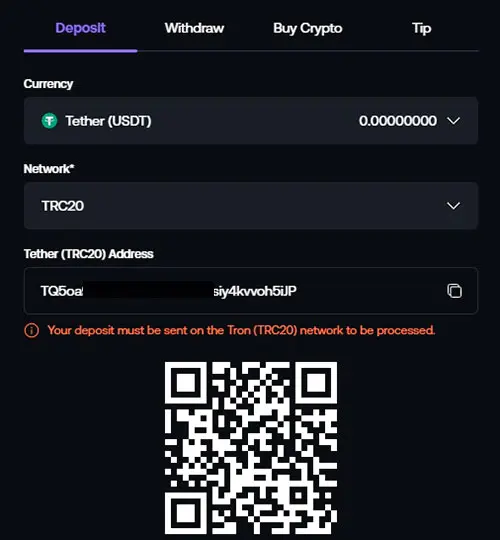
- Send a transfer from your wallet or a cryptocurrency exchange.
- Wait for network confirmations — typically 1–3 minutes on faster networks and 5–20 minutes on slower ones.
In our test, a 50 USDT deposit via ERC20 was processed in about 2–3 minutes, matching the expected timeframe.
Available withdrawal methods
The list of currencies available for withdrawal is the same as the list of deposits. Since all payouts are sent via on-chain transactions, it’s essential to choose the correct network and verify that your wallet supports the selected asset. Below is the full list of cryptocurrencies available for withdrawal from the Shuffle Casino.
| Cryptocurrency | Min/Max. Withdrawal | Withdrawal Time | Withdrawal Fee |
|---|---|---|---|
| Bitcoin (BTC) | unlimited | 10 – 60 min | 0.00002 BTC |
| Ethereum (ETH) | unlimited | 30 sec – 5 min | 0.0004 ETH |
| Litecoin (LTC) | unlimited | 1 – 5 min | 0.0005 LTC |
| Dogecoin (DOGE) | unlimited | 1 – 10 min | 1.5 DOGE |
| SHFL (Shuffle Token) | unlimited | 2 – 20 sec | 25 SHFL |
| Tether (TRC-20) | unlimited | 5 – 30 sec | 2 USDT |
| USD Coin (ERC-20) | unlimited | 30 sec – 5 min | 2 USDC |
| Ripple (XRP) | unlimited | 2 – 10 sec | 0.01 XRP |
| Tron (TRX) | unlimited | 5 – 30 sec | 1 TRX |
| Solana (SOL) | unlimited | 2 – 20 sec | 0.01 SOL |
| Shiba Inu (SHIB) | unlimited | 30 sec – 5 min | 125,000 SHIB |
| Binance Coin (BNB) | unlimited | 5 – 60 sec | 0.00020 BNB |
| Toncoin (TON) | unlimited | 5 – 30 sec | 0.050 TON |
| Bonk (BONK) | unlimited | 2 – 20 sec | 30,000 BONK |
| Dogwifhat (WiF) | unlimited | 2 – 20 sec | 1 WIF |
How to withdraw money from Shuffle: step by step
- Open “Withdraw”.
- Select a coin.
- Select the network (it must match the network of your wallet address).
- Enter the amount.
- Specify the wallet address.
- Confirm the transaction.
Crypto networks apply a fee for transfers, so the received amount may be slightly different than what you sent — this is ok. Always double-check the amount and network before confirming the transaction.
How to buy crypto for Shuffle Casino (On-Ramp)
If you don't have any cryptocurrency on hand, you can purchase it directly within Shuffle in the “Buy Cryptocurrency” section. This convenient on-ramp lets you pay using your preferred method through the selected provider (MoonPay or Swapped), and the purchased coins are instantly credited to your game balance.
Check out how to purchase cryptocurrency directly on the website:
- Specify an amount in USD.
- Select a coin (e.g. USDT).
- Select a provider.
- Make a payment using a Visa / Mastercard card, Google Pay, or Apple Pay.
- Have the cryptocurrency credited directly to your balance.
Note: Cryptocurrency purchases are handled by third-party providers, so additional fees may apply to the final exchange rate.
Limits, fees, and processing time
Shuffle’s transaction limits and processing times vary depending on chosen cryptocurrency. Minimum deposits start around $1, while withdrawals begin at $5. The casino does not charge any fees — only the network fee applies, which is lower for Tron and Litecoin and higher for Ethereum.
Withdrawal requests are processed promptly, but the overall speed depends on the blockchain: fast networks typically complete withdrawals within minutes, while Bitcoin and Ethereum may require more confirmations and take longer.
Check out the main limits and estimated processing times above, so you can review the withdrawal conditions in advance.
Shuffle Casino withdrawal policy
Withdrawals on Shuffle are simple, but it’s crucial to select the correct network and enter the accurate wallet address. When these details are correct, the request is processed directly without extra steps. Most delays aren’t due to Shuffle itself but result from mistakes like choosing the wrong blockchain or mistyping the wallet address. To ensure a smooth withdrawal, keep in mind a few rules that players often overlook:
- Ensure that all withdrawals are sent only to your own wallet. According to the AML Policy, transferring funds to someone else’s account or to a friend or relative’s wallet is prohibited and may lead to the transaction being declined.
- Identity verification upon withdrawal is a normal practice. Shuffle lets you play without completing KYC, but the system may request documents on your first withdrawal, for large withdrawals, or if unusual activity is detected. This is a standard AML precaution.
- The network and wallet address must match. If you choose USDT ERC20, the wallet address must also be ERC20. Sending to the wrong network can result in permanent loss of funds, so double-check before confirming the transaction.
- The network fee is held by the blockchain. On your wallet, you may receive slightly less than the requested amount due to standard network fees, which are shown in advance in the withdrawal window.
- Speed depends on the coin and network load. Shuffle handles most withdrawal requests in less than a minute, though confirmation speed can vary depending on the chosen cryptocurrency.
- Bonus funds are withdrawn only after fulfilling the wagering requirements. Any balance derived from bonuses will be unavailable for withdrawal until the wagering requirements are fully met.
Why did my cash out fail?
If a withdrawal fails, it’s usually due to issues with the cryptocurrency transfer, such as selecting the wrong network, entering an incorrect wallet address, a case when a fee is too low, or a high blockchain load. Delays can also occur due to KYC or source-of-funds verification. Below are the main reasons for withdrawal problems on Shuffle Casino and how to fix them.
- The network or wallet address is incorrect. If the selected network does not match the wallet address network, the withdrawal will fail.
- Verification (KYC) is incomplete. If the system requests identity verification but documents are not uploaded, the withdrawal may remain in the “Pending” status or be rejected.
- Pending bonus wagering requirements. If your balance includes bonus funds, withdrawals won’t be available until the wagering requirements are fulfilled.
- Limits exceeded. If the requested amount exceeds the allowed limit, the withdrawal may be declined. In such cases, you may need to split it into multiple transactions.
- Additional verification is required for large withdrawals. For large withdrawals, the system may request a re-verification of documents.
- Variation caused by network fees or commission The final amount received may vary from the expected total due to blockchain fees or network-specific factors.
- Technical delays or “Pending” status. Sometimes the network is overloaded, and the transactions take longer than usual to process.
In most cases, the issue can be resolved quickly by verifying your details, completing KYC if required, or fulfilling bonus wagering requirements. If the withdrawal still fails on a second attempt, contact the customer support.
Shuffle Casino account verification - KYC
Shuffle lets you play and deposit without completing full verification. However, for large withdrawals or if the system flags unusual activity, you may be required to verify your identity. This is a standard security measure to safeguard your account and funds.
Step-by-step KYC process:
- Log in to your account and open Profile → Verification.
- Select the country and document type (passport, ID card, driver's license or residence permit).
- Upload images of your document — the interface displays the photo quality requirements.
- If requested by the system, provide an additional photo or a selfie.
- Submit your data and wait for the verification result.
FAQ
BC.Game positions itself as a global crypto casino, but the availability of the platform varies s...
Cloudbet has run as a crypto casino and sportsbook since 2013. Most players arrive with one pract...
Duelbits is a licensed crypto casino and sportsbook known for its fast payouts, extensive games s...
Roobet and Duelbits are often compared side by side, and rightfully so. These two major crypto ca...