



DriveHUD 3
DriveHUD 3 is a ground-up rebuild of the poker tracker, not a point release on top of DriveHUD 2. Ace Poker Solutions kept the HUD and hand database at the core, then built a new engine, a custom Report Builder, a dedicated leak-analysis system, an integrated GTO solver and trainer, and optional AI hand review around it. The idea is a single loop: find where you are losing, drill into the exact hands, compare your line against both a solver and the actual player pool, then drill that correction until it sticks — without leaving the app.
Speed is the claim the rest hangs on. DriveHUD puts the rebuilt engine at 100 to 200 times faster than DriveHUD 2, and a tracker you can query in seconds gets used differently from one you wait on. That is the real shift here: DriveHUD 3 is trying to move from a place you store hands to a place you actually study them. Below is what that looks like feature by feature, which sites it runs on, and what it costs.
What's new in DriveHUD 3
The headline is the rebuilt database and reporting engine. Everything downstream — filtering, player analysis, population reports, jumping between stakes and positions — rides on it, which is why the speed question comes first and the feature list comes second.
On top of that engine sit the tools that define this release:
- A rebuilt database and reporting engine — the core of every change.
- Report Builder for custom reports.
- Expanded leak analysis.
- MDA population reports.
- A built-in GTO calculator and a separate GTO trainer.
- A reworked filtering system.
- An improved hand-history grid.
- Timing tells.
- Optional bring-your-own-key AI hand review.
Holdem and Omaha (PLO 4/5/6) are both covered, and the HUD itself is still here and still customizable.
Speed and the new engine
Speed is not a spec-sheet nicety for a tracker — it changes how you use one. On a slow database you run a report, read it, and stop, because every follow-up question costs another wait. On a fast one you keep going: change a filter, compare another position, split single-raised pots from three-bet pots, open the hands underneath — all in the same sitting. That interactivity is the actual product, more than any single number.
According to DriveHUD, reports and filters in version 3 run 100 to 200 times faster than in DriveHUD 2, scaling with database size and report complexity — answers in seconds rather than minutes. The gain shows up most when you load reports with a lot of hands, stack several filters, switch between players, stakes, positions or game types, review population data, or run detailed leak analysis. The point of that speed is not the benchmark; it is that exploring your database stops being a chore you avoid.
Our take: of everything in this release, the engine is the change that actually matters. Extra reports and stats only help if you'll sit and explore them — and on DriveHUD 2 that exploring is exactly what most players quietly stopped doing. If the speed holds up on a real database, it doesn't just save minutes; it decides whether the rest of the toolset gets used at all.
Report Builder
Most trackers ship a fixed set of standard reports. They answer common questions and stop short of the specific one you actually have. DriveHUD 3’s Report Builder is the answer to that gap: you pick what to analyze, choose how results are grouped, and add the stats you care about.
You can build a report around almost any slice of the game:
- Position, stakes, game type, table size.
- Starting hands, preflop and postflop actions.
- Pot type, bet sizing, board texture, hand strength, opponent type.
- Winnings, expected value, showdown and non-showdown results.
Plus hundreds of individual stats.
In practice a strategic question becomes a report without a second piece of software. Build a positional report, a three-bet-pot report, or a continuation-bet-frequency view, then filter it down to a game, a stake, or an opponent type, and click straight through to the hands underneath. The Report Builder also gives coaches and content creators a way to design specialized analytical views for different formats instead of living inside the default reports.
In our view this is the tool most likely to change how you study. Stock reports answer the questions everyone already asks; the edges usually sit in the one question only you have — a specific sizing, a specific spot, against a specific type — and this is what lets you ask it.
Leak analysis
The leak-analysis system is where a hand database earns its keep. Instead of asking you to scan hundreds of stats by hand, it groups the parts of your game — preflop ranges, blind defense, positional results, aggression, c-betting, turn and river barreling, folding frequencies, showdown and non-showdown results, bet sizing, results by pot type and by opponent profile — and points you at the ones that look off.
The point is not to flag a stat as high or low and leave you there. It is the path from a warning sign to the exact hands producing it. Say you are bleeding chips from the big blind:
- Open the leak-analysis section.
- Compare your frequencies against the baseline.
- Narrow to big blind versus button.
- Split single-raised and three-bet pots.
- Sort the biggest losing hands.
- Check your decisions against GTO.
It all happens inside one investigation.
The redesigned filtering feeds the same loop and reaches further than DriveHUD 2 did, with opponent-specific filtering by action across every street. That opponent and player-type analysis is what surfaces results a whole-database stat hides — river calls that look fine overall but fall apart against passive players who rarely bluff, or value bets that quietly underperform against one profile.
GTO and population data
Two of DriveHUD 3’s tools answer different questions, and it helps to keep them apart. The built-in GTO calculator answers what a balanced strategy should look like — betting and checking frequencies, calling, folding and raising, sizing, expected-value differences, range construction and mixed strategies across board textures. The MDA (Mass Data Analysis) reports answer what the actual player pool is doing: where a population overfolds to three-bets, under-defends the blinds, over-c-bets, under-bluffs rivers, or leans on predictable sizings, broken out by game type across Holdem and PLO cash, sit-and-gos and MTTs.
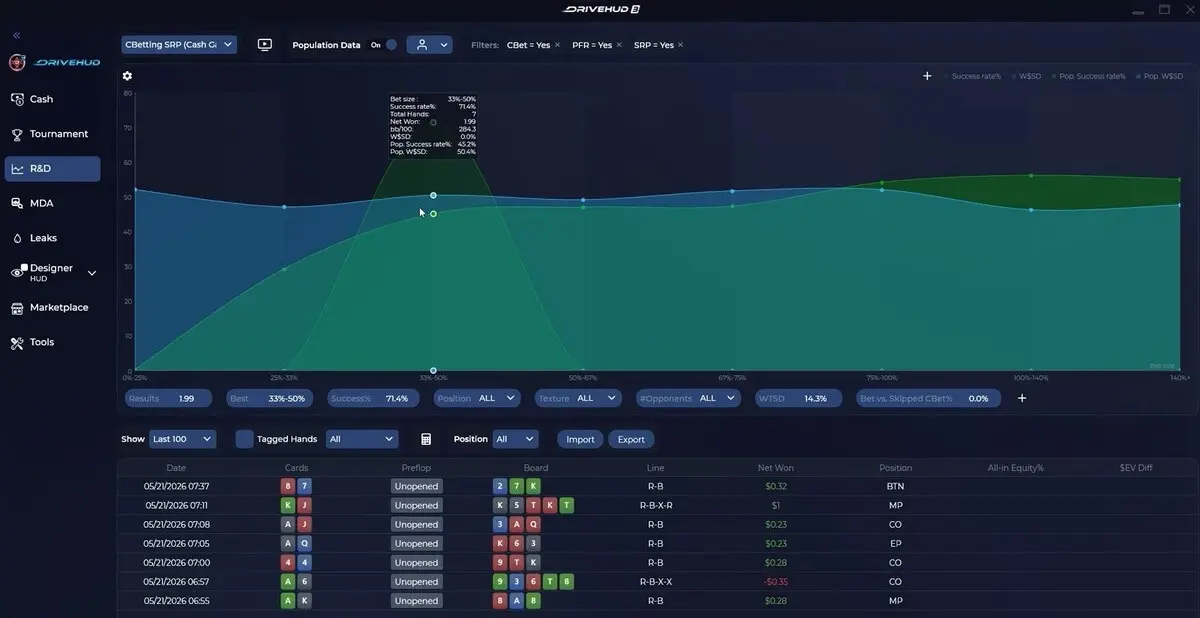
The gap between those two answers is where exploitative money lives. A solver tells you the game-theory-correct play; MDA tells you where real opponents drift from it, so you can adjust toward the pool instead of against a robot. One honest caveat belongs here: MDA reads lean hard on sample size, and a population conclusion drawn from too few hands is a guess with a chart attached.
The GTO trainer is the third piece, and it does a separate job from the calculator. The calculator is for understanding a spot; the trainer is for drilling it — preflop and postflop decisions, sizings and mixed strategies, repeated until the pattern is automatic rather than looked up.
Where we'd point your attention is MDA. A solver you can get anywhere; a read on how your actual pool drifts from balance is the harder thing to build yourself, and it's what turns theory into an adjustment you can use tomorrow — as long as you respect the sample-size caveat above.
Hand review
A report is only useful if you can get from a number to the decisions behind it. The rebuilt hand-history grid is that bridge: sort hands by winnings, expected value, pot size, date, position, starting hand, action or marked status, find the biggest losing pots, replay a hand street by street, note it, and return to the broader report. A negative trend in a report becomes a stack of specific hands you can actually look at.
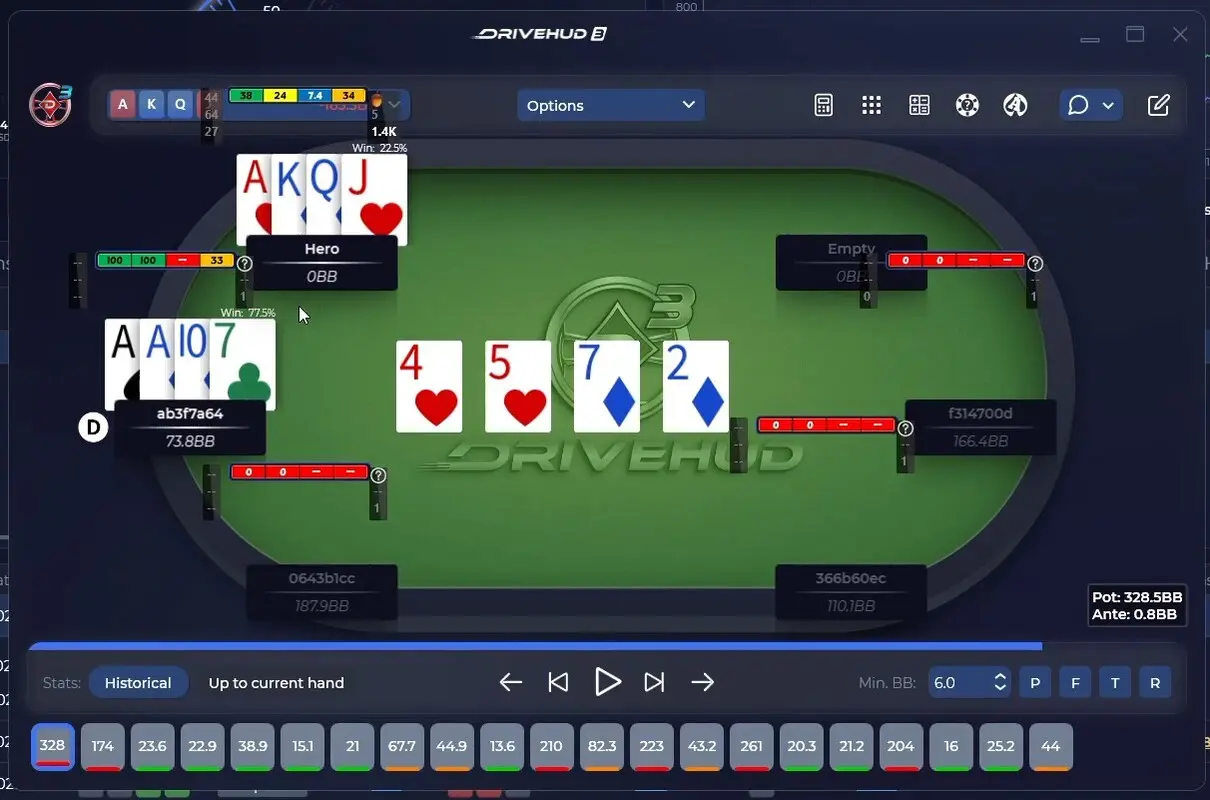
DriveHUD 3 layers two more signals onto that review. Timing tells record how long a player took before each action, which can hint at tendencies — instant checks, long pauses before big bets, fast calls with medium-strength hands, a delayed river followed by a bluff. Read them across a sample, not off a single hand: connection lag, multi-tabling and time-bank use all muddy the signal, and timing is a supporting read, never proof of a holding.
The optional AI hand review is the other. With your own AI API key — free options included — you send a hand out with one click and get structured feedback on the line, alternative plays, and spots worth more study. It works as a second opinion to pressure-test a read, not an oracle: poker decisions turn on ranges, tendencies and stack depths a model does not fully see, so the value is convenience, not a verdict.
It’s still a HUD
Under all the study tooling, DriveHUD 3 is a working HUD and tracker. You can edit which stats show, arrange panels and popups, set color ranges and minimum sample sizes, split positional stats, and keep separate layouts for Holdem and Omaha. The aim during play is not to cram the most stats on screen — it is to make the few that matter easy to read while a hand is live.
Supported poker sites
DriveHUD has always been strongest on US-facing sites, and the top Ultimate+ edition adds Asian app sites through the Asian Hand Converter. The main supported sites and apps:
- ACR Poker.
- BetOnline.
- Bovada.
- WPT Global — via the Asian Hand Converter (Ultimate+).
- PokerBros — via the Asian Hand Converter (Ultimate+).
- PPPoker — via the Asian Hand Converter (Ultimate+).
- ClubGG — via the Asian Hand Converter (Ultimate+).
This is the core set, not the full list — check DriveHUD's current supported-site page against where you actually play.
Pricing
DriveHUD 3 sells in three yearly editions, all of which include the GTO solver and trainer, automated leak analysis, MDA reports, and Holdem plus Omaha. The split is by stakes and add-ons, not by cutting features out of the cheaper plan. A free trial is available, and DriveHUD 2 owners get a legacy upgrade discount that carries their data forward.
| Edition | First year | Renews | Built for |
|---|---|---|---|
| Core | $59.99 | $19.99/yr | Buy-ins up to $50 |
| Ultimate | $119.99 | $39.99/yr | All stakes |
| Ultimate+ | $199.99/yr | $199.99/yr | All stakes + Asian Hand Converter |
Our read on the price: at $59.99 for the first year (Core) or $119.99 (Ultimate), DriveHUD 3 sits in the same range as the two long-standing rivals — Holdem Manager 3 and PokerTracker 4 both run about $60 for small stakes and $100 for all stakes. The real difference is the model: those two are one-time purchases you own, while DriveHUD 3 is a yearly licence (renewing cheaper, at $19.99–$39.99). The first year is competitive; over several years you're weighing a subscription against buy-once software. What DriveHUD 3 puts on its side of that trade is the bundled GTO solver, trainer and MDA reports — extras that on the rivals mean add-ons or separate tools.
Is DriveHUD 3 worth it?
DriveHUD 3 is built for the player who wants to do something with a database, not just carry a HUD at the table. The engine speed is what makes that realistic: if you can change a filter and see the answer immediately, you dig into leaks you would otherwise leave alone, and the reporting, population data and training sitting in one app turn that into a genuine study routine rather than a stack of separate tools.
It is not for everyone. A recreational player who wants a clean HUD and nothing else is paying for depth they will not open, and the breadth of tools is a real learning curve. The AI review needs your own API key, the plans renew every year, and the answer to “can I even run this where I play” depends on your site’s rules, not on the software. For a serious grinder who studies between sessions, though, the loop DriveHUD 3 is selling — find the leak, see the hands, compare against solver and pool, then drill it — is the reason to look.
✅ Pros
- Rebuilt engine built for fast, interactive querying
- Custom Report Builder turns a question into a report
- Leak analysis links a warning sign to the exact hands
- GTO solver, trainer and MDA population reports in one app
- Holdem and Omaha both covered, plus a free trial
❌ Cons
- HUD support depends on the poker site — some ban them
- Breadth of tools is a real learning curve
- AI hand review needs your own API key
- Plans renew annually
- App-site coverage sits only in the priciest edition


FAQ
Hand2Note is an advanced software for tracking hands and processing poker statistics, suitable for beginners and professional grinders. The tracker contains a set of general tools present in similar programs and many unique ones. We will discuss those in particular in our review.
The latest version of Holdem Manager is not an update or add-on that can be downloaded via HM2. In other words, HM3 is a brand new product developed from scratch.
PokerTracker 4 is one of the most famous poker programs for collecting, analyzing, and displaying statistics. The software is suitable for any poker player, as it supports all popular disciplines, game formats, and poker rooms. You can download Poker Tracker 4 and use it for free for 14 days without restrictions.