


- Home
- Poker software
- Poker software
- PokerHero, a preflop simulator with chart editor and error analysis
PokerHero, a preflop simulator with chart editor and error analysis
PokerHero is an online trainer for learning and practicing preflop strategy, which helps turn knowledge of the charts into quick and correct decisions at the table. The program combines a simulator with a flexible range editor, ready-made packs, and Leak Finder for analyzing your own hand history. Check out this review, as we examine the main features of PokerHero, ways to fix errors, and functions that will help improve your game in Spin & Go, cash, and MTT.
What is PokerHero
PokerHero is an online preflop strategy trainer that helps players do more than study charts. It teaches them how to apply it in real-game situations.
The trainer lets users practice with any hand. It tracks mistakes, collects statistics, and shows the optimal decisions in different scenarios.
PokerHero’s main feature is the ability to analyze your own play. The service allows users to upload hand histories, which its built-in Leak Finder compares against selected charts to identify deviations and create dedicated training sessions based on the mistakes.
PokerHero supports Spin & Go tournaments (regular speed and Nitro), cash games (6-max and full ring, 100bb and deep stacks), and MTTs (ante structures, short and medium stacks, and ICM scenarios on the bubble and at the final table).
The service runs in a browser, so there’s no need to install additional software. You can also train using a mobile browser, and your data syncs across multiple devices.
Other features include:
- Interface languages: Russian, English, German, Spanish, French, and Portuguese.
- Registration: via email or Google.
- Support: in-app contact form and Discord.
Trainer
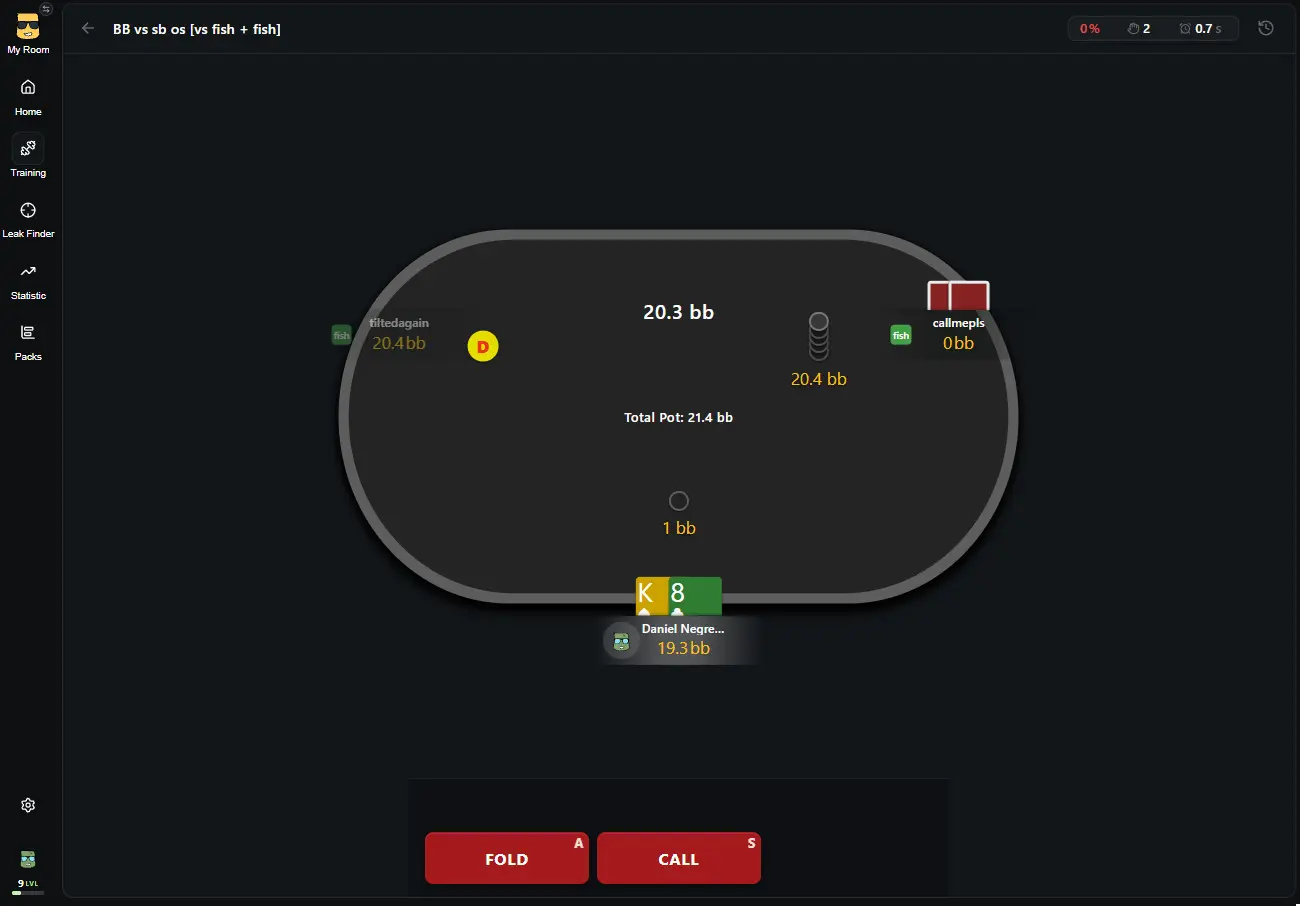
The PokerHero trainer features a full table interface that closely resembles the one in the online poker room.
You can customize each training session to suit your specific goals:
- Hotkeys. You can assign keys for fold, check/call, all-in, and three different raise sizes. This allows you to use a familiar layout and train your decision-making process until it becomes muscle memory.
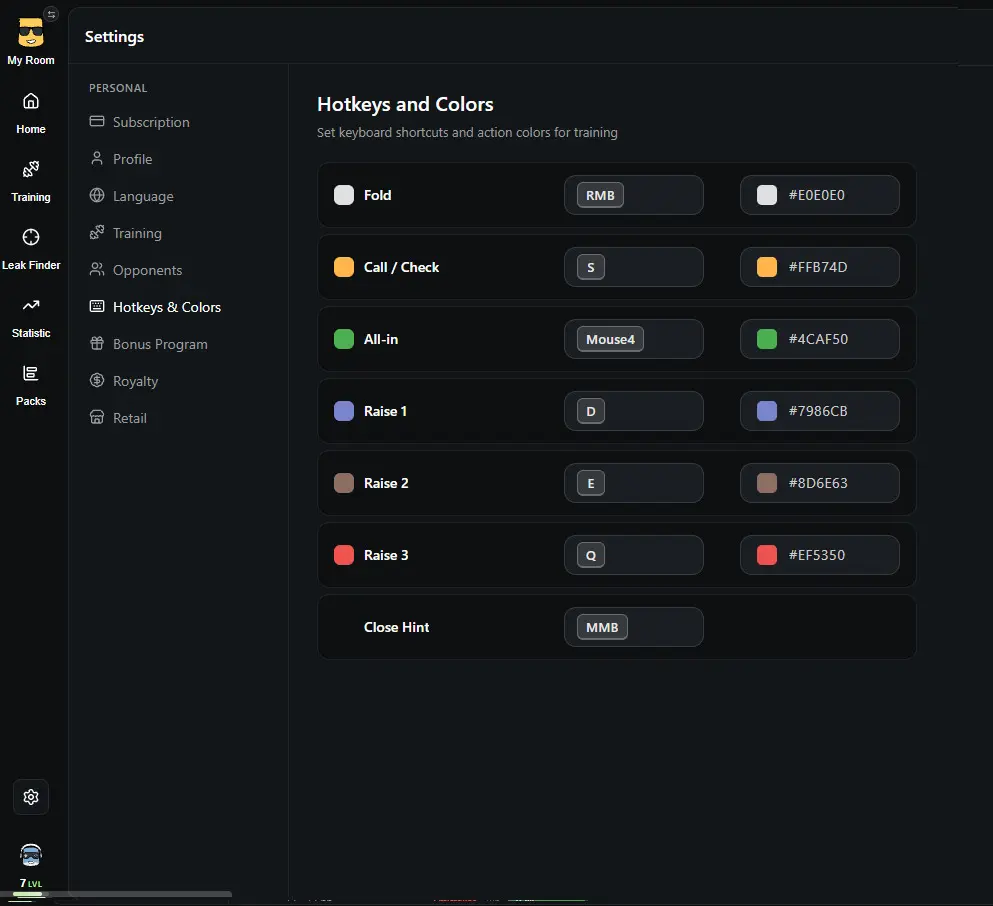
Hotkeys - Action timer. You can limit the time allowed for making a decision to 7, 5, 3, or 2 seconds.
- Table customization. Options include choosing the felt and frame colors, displaying effective stacks, highlighting opponents, and configuring the display of statistics and the correct chart following an error.
- Randomizer for mixed strategies. If a chart suggests multiple actions with specific frequencies, a random number generator (from 1 to 100) helps determine the correct move for a given hand.
- Hand filters. These allow you to exclude straightforward decisions and focus on marginal spots, situations where a precise understanding of ranges is especially critical.
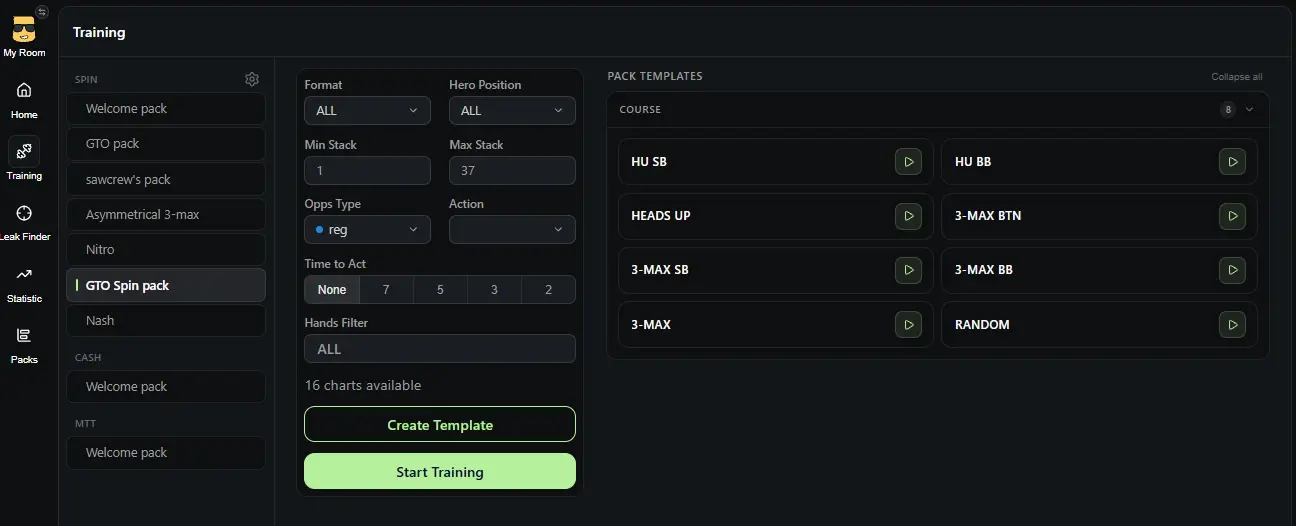
Train Filters
After each training session, you can review every hand in the replayer, check your answer, the correct action, and the time it took to make your decision.
Chart Editor
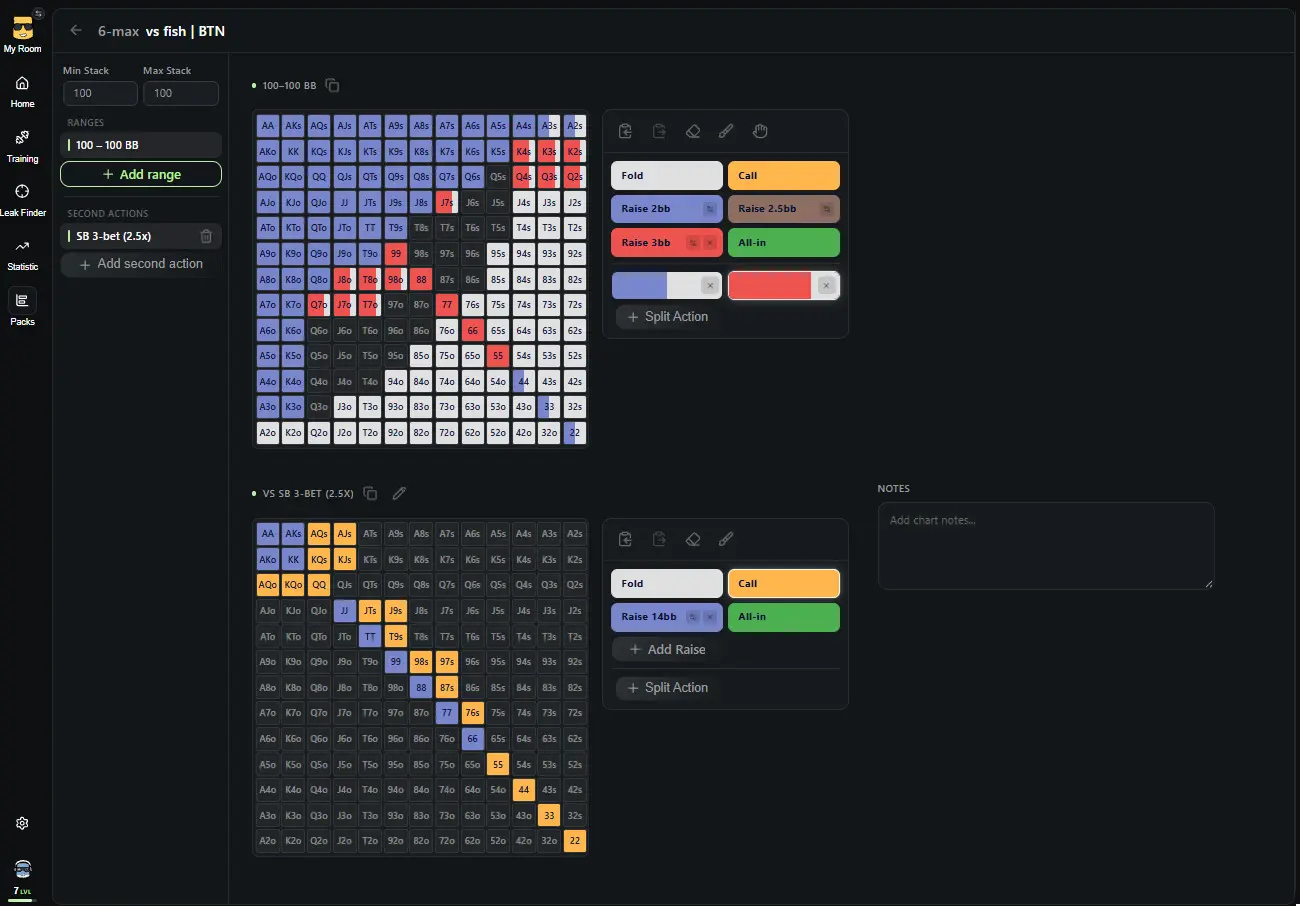
PokerHero allows you to go beyond pre-made ranges. Its built-in editor enables you to create charts tailored to own strategy and adapt them to various game conditions.
Key features of the editor:
- Range customization. Users can create charts for various stack depths, antes, and raise sizes.
- Mixed actions. It is possible to define two, three, or four different ways to play a single hand and assign specific frequencies to each.
- Advanced decision-making. You can configure responses to 3-bets and 4-bets, as well as isolation raises, and adjust how frequently these scenarios appear during training.
- Copying and notes. Ranges can be copied, settings can be transferred, and comments can be added to each chart.
- Pre-configured game scenarios. A library of spots is available for HU, 3-max, 6-max, and 8-max formats.
This approach allows you to build your own preflop training system, account for the specifics of each game format, and regularly update your strategy as you move up in stakes.
Types of opponents
In poker, a single baseline range isn’t always enough. The optimal play can differ depending on whether you’re facing a tight regular or an aggressive recreational player.
PokerHero lets you create custom opponent profiles, such as fish, reg, maniac, or nit. You can assign each profile a name and color, and it will appear directly at the table.
You can then build dedicated charts for different opponent types and train accordingly, taking the tendencies of your player pool into account.
Leak Finder
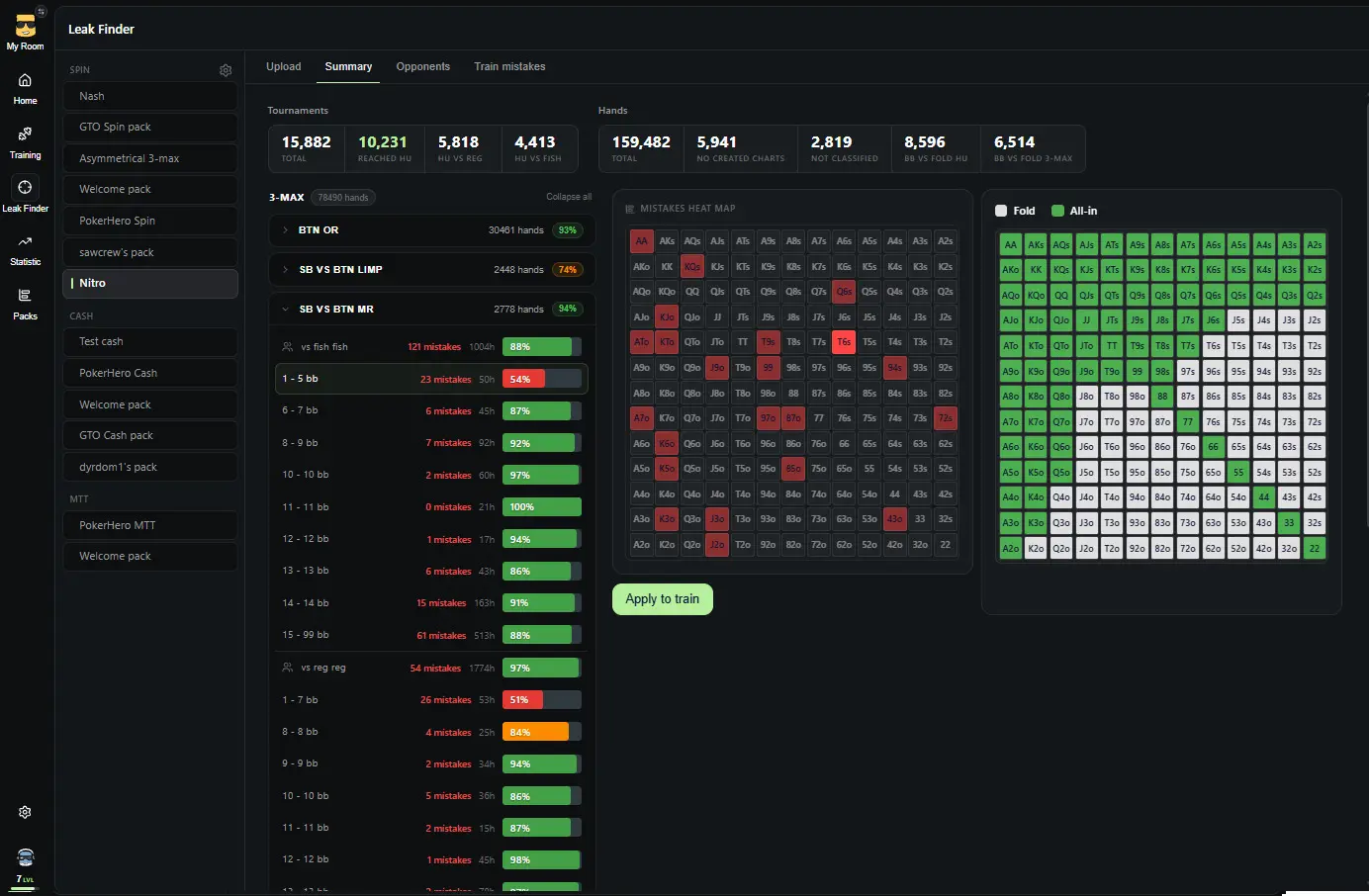
Leak Finder takes training beyond abstract scenarios by analyzing the player’s own hand history.
How Leak Finder works:
- Upload hand histories. Simply select the folder containing your hand history files, and PokerHero will automatically process the data and prepare it for analysis. Currently, it supports Spin & Go hands from Winamax, PokerStars, GGPoker, and RedStar.
- Compare decisions against charts. Leak Finder checks your decisions against the selected chart pack. The report shows the number of hands and tournaments analyzed, as well as the situations and opponent types against whom you deviate from the strategy most often.
- Label opponents. You can assign player types based on screen names. Automatic opponent classification is also available for players against whom you’ve collected a sufficient number of hands.
- Train your specific leaks. Identified deviations can be turned into dedicated training sessions. You can replay situations where you made mistakes in real games and filter them by spot, stack depth, opponent type, or individual player.
This approach helps players avoid wasting time on decisions they’ve already mastered and systematically address weaknesses in their preflop strategy.
Statistics
PokerHero collects detailed training statistics, allowing you to evaluate not just the number of hands played, but also the quality of the decisions made.
The program offers:
- Accuracy and error count. Performance statistics are available for each pack and for individual charts.
- Error heat map. Shows which hands a player misplays most frequently.
- Training templates. Allow you to save settings for format, position, stack depth, opponent type, timer, and hand filters.
- Training goals. You can set a target number of hands and a desired accuracy level, then track your best results.
- Session replayer. Allows you to review specific hands and compare your chosen actions against the correct decisions, considering the time taken to respond.
To keep players motivated, PokerHero features experience points (XP), levels, training streaks, a leaderboard, and customizable avatars. You can also save a session result as an image and share it with others.
Ready-made packs
If you don’t want to build all your charts from scratch, PokerHero offers a store of ready-made strategy packs. They cover different formats and training goals, from fundamental preflop strategy to more specialized solutions.
Available options include:
- GTO Pack. Basic GTO ranges for Spin & Go (HU and 3-max formats) covering various stack depths.
- Nash. Push/fold ranges based on the Nash equilibrium for short-stack play.
- Asymmetrical 3-max by Tema2010. A strategy for 3-max games involving significant stack disparities.
- Nitro Pack by LuckyPlayer7. Ranges for Spin & Go Flash (up to 15 BB, in 1 BB increments), including adjustments for playing against "fish" on Winamax.
- Full GTO Pack. A complete preflop tree for 6-max cash games with 100 BB stacks. Includes a one-month Premium subscription.
- dyrdom1 Pack. A strategy for 6-max cash games up to NL500, featuring dedicated chart versions for playing against regular players and "fish," as well as pre-configured hand filters.
Ready-made packs let you get started with training faster using prebuilt ranges. You can also combine them with your own charts and training sessions to tailor the learning process to your current goals.
All packs created by well-known players must be purchased separately. Payments are processed via PayPal.
PokerHero for poker schools and teams
PokerHero isn’t just for individual players; it also caters to poker schools, funds, and teams that need to organize training and track student progress.
To support this, the platform offers dedicated workspaces called hubs. Within a hub, you can create teams, assign roles such as owner, moderator, coach, team leader, and student, and review each member’s statistics.
Additional features include video playlists with chapters and tags to help organize training materials. You can automate the addition of students via the API.
How much does PokerHero cost?
PokerHero offers both free access and a paid Premium subscription.
The free version is available immediately upon registration. It includes a Welcome Pack with trial charts, the option to create training templates, and access to statistics.
Premium unlocks the full suite of tools:
- Unlimited training across all packs.
- Ability to create custom packs, charts, and opponent types.
- Access to Leak Finder.
- Comprehensive statistics and error history.
- Basic PokerHero packs for Spin, Cash, and MTT games that users own permanently.
PokerHero offers three paid subscription options:
- 1 month of Premium — $30 per month, total cost $30.
- 3 months of Premium — $25 per month, total cost $75. This option is marked as the most popular.
- 1 year of Premium — $20 per month, total cost $240. The annual subscription offers the lowest monthly rate and is marked as the best value.
An annual subscription saves $120 compared to paying for 12 monthly subscriptions separately.
To purchase Premium, you should first log in to the service’s website and click the "Upgrade" button on the homepage. Payments can be made via PayPal or cryptocurrency (via Discord).
Why Choose PokerHero
PokerHero brings together preflop strategy training and real-game analysis in a single platform.
The software’s main advantages include:
- Poker table training. A familiar interface, hotkeys, and a timer to help you make decisions faster.
- Flexible range editor. Create your own ranges, define mixed strategies, and account for stack depths, antes, and raise sizes.
- Opponent-specific adaptation. Dedicated ranges allow players to practice playing against different types of opponents.
- Real-world error analysis. The "Leak Finder" feature turns your hand history into a personalized training program.
- Detailed statistics. Accuracy metrics, error heatmaps, hand replays, and goal tracking help you monitor your progress.
- Ready-made packs. Start with pre-built ranges and gradually transition to your own custom solutions.
- Support for training schools and teams. Hubs, user roles, student statistics, and an API streamline the organization of training.
- Browser-based. No need to install software on your computer; you can even train from your smartphone.
Though, it is important to take the limitations of Leak Finder into account: at the moment, hand history analysis is supported for Spin & Go from four poker rooms.


