


- Home
- Best Poker Rakeback Deals
- PokerKing App Download
Winning Poker Network
4.7
| Bonus | 100% up to $2,000 |
| Rakeback | up to 65% |
18+ | T&C apply, Play Responsibly
| Room type | Licensed |
| License | Curaçao |
| Payments | |
| Platforms |


Key facts

High rakeback up to 65%
Millionaire MTTs
WPD exclusive promotions
Shares traffic with US players
Exotic formats like Stud

Cashout fee
| Reliability | 4.9 |
| Game selection | 4.9 |
| Bonuses and promotions | 4.7 |
| Casual players | 4.2 |
| Deposits and withdrawals | 4.9 |
| Convenience of the software | 4.5 |
PokerKing screenshots
Table of contents
PokerKing App Download
Written by Rodion LongaFact-checked by Dmitry NewStedUpdated 2/6/2026
All PokerKing games and features are available on any device. The client is lightweight and supports all major operating systems: Windows, macOS, Android, and iOS, so you can easily play on a computer or mobile device.
Next, we’ll walk you through the installation and registration process. It’s quick and simple, but there are a few important details to keep in mind to avoid confusion when you log in for the first time.
Download and create a PokerKing account
- Clear your cookies, or use a new web browser.
- Visit the >>official PokerKing.com website<< and download the PokerKing client for your operating system.
- Run the installation file. Launch the client using the shortcut created on the desktop.
- Launch the client using the shortcut created on the desktop. In the login window, click on the “Sign Me Up” button.
- Enter your nickname, email (click Send Code and enter the code from the email), password, and the WPDVIP bonus code.
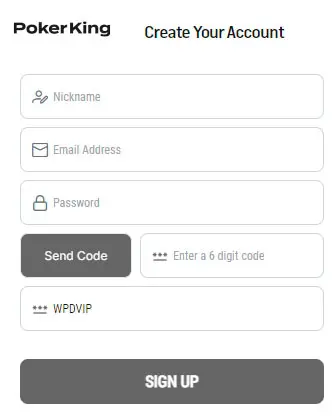
- Next, fill in the form with your data.
- Send us the email address to confirm that your account is correctly tracked under our affiliate program.
Why play with us
Worldpokerdeals has vast experience in the poker affiliate market. We deal directly with poker room owners and administrators to offer our players the best deals, and our team of 10 managers provides fast and attentive service.
Our players get:
- VIP rakeback deal.
- No commission for any number of cashouts per month (high rollers).
- Professional customer service seven days a week.
Please contact our team to get a deal and start playing now:
Got a question?
Let's chat:
Got a question? Let's chat:
Anton
online
Head of Partnerships & Support


FAQ
✅ Where can I download the PokerKing app?
✅ I have a problem with login — what can I do?
Related poker rooms