


- Home
- Best Poker Rakeback Deals
- ClubGG Poker App Download
| Bonus | Not available |
| Rakeback | up to 65% |
| Room type | Agent |
| License | Not required |
| Payments | |
| Platforms |


| Reliability | 4.0 |
| Game selection | 4.0 |
| Bonuses and promotions | 3.1 |
| Casual players | 5.0 |
| Deposits and withdrawals | 4.8 |
| Convenience of the software | 4.5 |
ClubGG Poker App Download
ClubGG is a free poker app from NSUS, the company behind GGPoker, and it runs on any screen. On Android, install it from Google Play. On iPhone and iPad, get it from the App Store. For Apple devices, you need iOS 15 or later and about 450 MB of free space.
On desktop ClubGG ships official native clients for both Windows and macOS. You can download them straight from clubgg.com. Windows users who prefer Google's ecosystem can also install ClubGG through Google Play Games on PC.
No emulator, no workarounds — all you have to do is pick your platform, install it, and you'll be at the tables in minutes. Remember, you must be at least 18 years old to join ClubGG.
Once the app is running, the part that decides your experience is the club you join. Our team places players in the best ClubGG clubs.
How to download ClubGG on Windows PC
ClubGG has a free native Windows client, and you get it from the official site — no app store, no emulator.
- Go to clubgg.com and click the Windows button.
- Run the installer.

Run setup 
Choose folder 
Installing process 
ClubGG windows app - Log in with your GGpass, or create one — see the account section below.
If your machine already runs Google Play Games on PC, that's a second route: the ClubGG listing there is marked as available on Android and Windows.
Under the hood this client is a light video game, and the spec sheet reads accordingly. Minimum requirements:
- OS: Windows 10 21H1 or newer, x86/x64 processor with SSE2
- RAM: 4 GB
- Disk space: 1 GB free
- Video: 2 GB of video memory with DX10–DX12 support — Intel UHD 630, AMD Radeon R7 260X / RX 460, or Nvidia GTX 750 Ti / GTX 950 clears the bar
- Connection: 1 Mbps or faster
Recommended: 8 GB of RAM, 2 GB of free disk space, 4 GB of video memory with OpenGL 3.0+, and a 100 Mbps connection. A few exceptions apply: the Radeon HD series, 6600M/6700M, Radeon 3000 and R5 200/220/240 cards are not compatible, and ARM-based Windows machines are not recommended.
How to download ClubGG on Mac
The Mac version lives on the same download page: hit the macOS button on clubgg.com and run the installer.
The minimum bar is a 2017-or-newer Intel Mac on macOS 11 or higher, with 4 GB of RAM and over 1 GB of free space. The recommended spec is a 2020-or-newer Apple Silicon Mac, 8 GB of RAM, 2 GB of free space on an SSD, and a 13.3-inch or larger Retina display. On Apple Silicon Macs running macOS 12 or later, the App Store version of ClubGG installs as well — handy if you already manage apps through it.
How to download ClubGG on Android


The official route is Google Play: search for ClubGG Poker, published by NSUS Limited, and install. The app needs Android 5.1 or higher; the listing shows over 500K downloads.
APK mirrors do host ClubGG builds, and you'll meet them high in search results. We'd still install from Play: you get signed builds and automatic updates instead of a loose file from a third party vouching for itself.
How to download ClubGG on iOS
ClubGG sits in the App Store under NSUS Ltd. You need iOS 15 or later and about 450 MB of free space; iPad is supported alongside iPhone. Search for ClubGG Poker, install, and log in with your GGpass.
Can you play ClubGG on an emulator?
You don't need to anymore. In practice the app won't let you. ClubGG's terms don't mention emulators at all, but the app blocks them anyway — several player reports describe the client detecting emulators like Bluestacks or LDPlayer and refusing to launch.
Third-party tools advertise ways around the block. We don't recommend testing how ClubGG's security team feels about that with an account you care about. If you want ClubGG on a big screen, the native Windows and macOS clients above are the answer the emulator guides haven't caught up with.
How to create a ClubGG account
Registration runs through GGpass — one account for the whole GG ecosystem, shared between your desktop and mobile devices.
- Visit the official ClubGG website.
- Download and install the app.
- Open the app and tap Join.
- Tap Sign Up Now, or log in with Facebook, Google, or Apple ID.
- Enter the email address you will use for your GGpass.
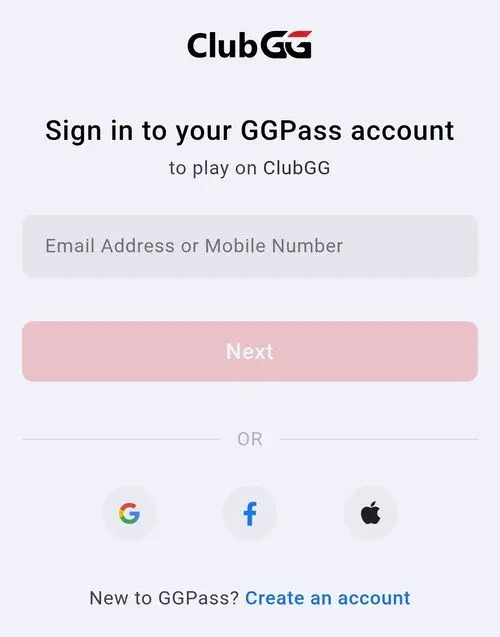
- Verify your email with the code you receive, then set a secure password or access key.
- Choose your country, nickname and avatar — the nickname is your name at the tables. You can change both later.
- Tap Referral at the bottom and enter the bonus code WPDEALS.
The same GGpass flow, with screenshots, is covered step by step in our GGPoker download guide.
Reach our team to get access to the best ClubGG clubs and start playing now!